

Find and book
Browse available sessions and follow the booking steps. Review the session and booking details in one place.
Let members find membership information, attendance, classes, personal training, payment records, progress and notifications in their own KRYOON portal.
Give members useful self-service access while keeping control with the gym.
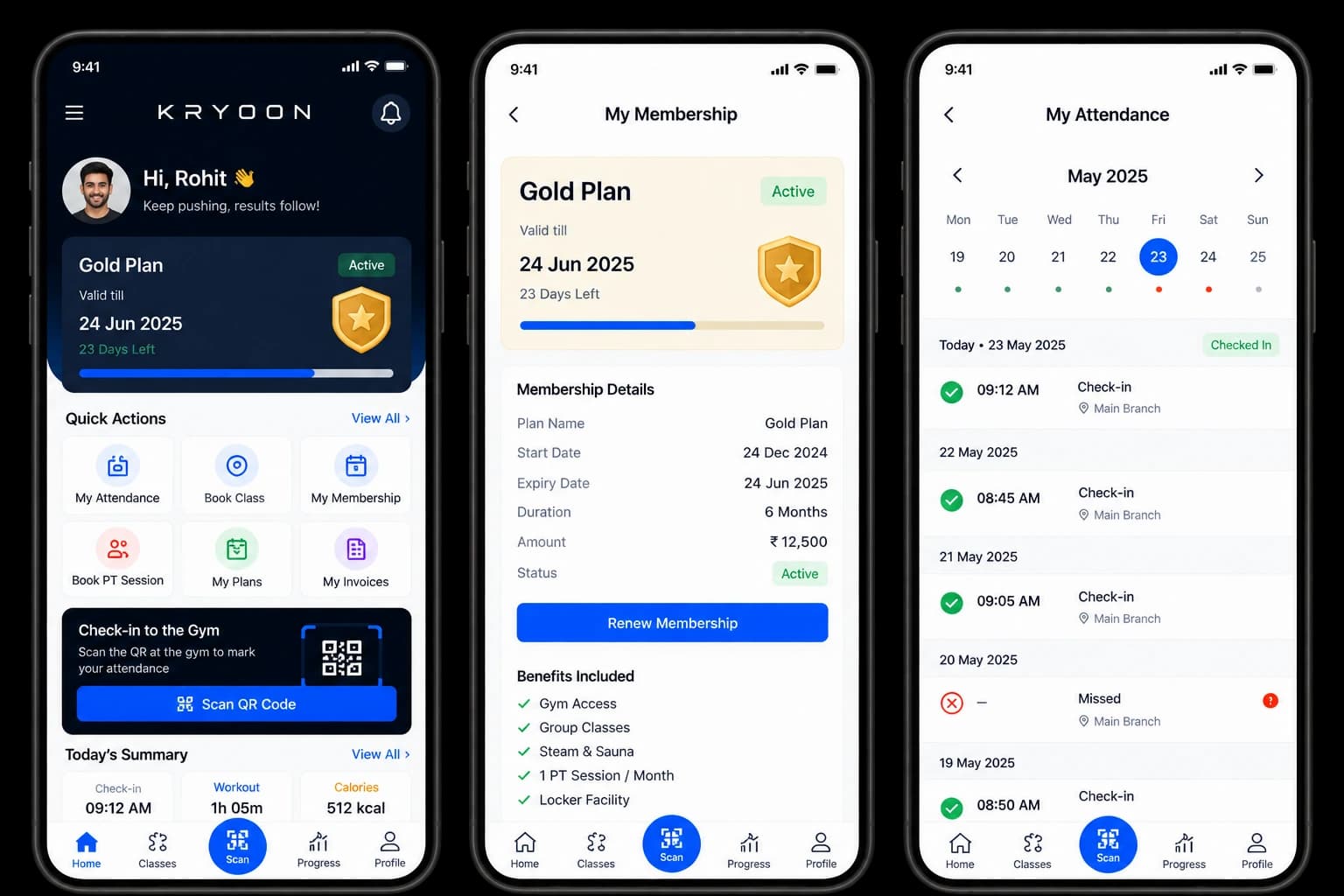
Swipe to explore the screens. Member web portal previews. Example data.
Illustrative screen previews with example data. Available services depend on your gym and plan.
Membership dates, class bookings and invoice requests can create a steady stream of calls and messages. Give members a clear place to find the information they need.
A focused navigation keeps the everyday member actions easy to find, especially on a phone.
A useful starting point brings the member’s membership, upcoming activity and updates into view. Members can find their next step without navigating the tools your team uses to run the gym.
Let members review their membership name, dates and relevant details in their own portal. A clear Valid Till date makes it easier to understand when the current membership ends.
Members sign in to their portal and scan the gym’s QR code with their phone. QR attendance keeps the arrival routine simple, without requiring GPS or biometric equipment.
Find Scan in the Member Portal.
Allow camera access when prompted.
Follow the on-screen check-in steps.
Find the visit in attendance history.
Members can review their attendance history and look back at their own gym activity. Routine attendance questions have a place to start before they reach the reception desk.
Members can explore class sessions, dates, times and availability, and review their bookings where the gym’s plan and their membership include them.
Classes & personal training: Growth and Pro
Browse available sessions and follow the booking steps. Review the session and booking details in one place.
See relevant waitlist information, booking updates and changes or cancellations to booked sessions.
Give members a place to review relevant PT sessions, trainer details and package information. Keep package dates and validity available alongside the training relationship.
Classes & personal training: Growth and Pro
The dedicated Progress area gives members a place to review the progress information their gym makes available. Keep the focus on the member’s training journey and the guidance from their gym team.
Members can review relevant payment records and invoices in their portal. Your gym records member payments manually; the portal helps members see those records.
Review the payments your gym has recorded for the member.
Find relevant invoices without requesting each one from reception.
Give members a place to find the documents their gym makes available to them. Keep useful membership-related information with the rest of their gym experience.
Bring relevant membership, class and PT notifications into the member experience. Members can find notices and review the activity they relate to in the same portal.
The Profile area keeps relevant member details, membership information and Valid Till close at hand. Members have a personal gym experience that works on the phone they already carry.
The gym enables Member Portal access and helps the member get started with their own account. Give members useful access when your gym is ready to offer it.
Keep the experience clear for the person using it. Members focus on their gym relationship, while your team works in the Owner and Staff experiences.
Oversee the gym and wider business operations.
Managers, Trainers and Accountants work on their responsibilities.
Members find their personal information and available services.
Memberships, visits, classes, personal training, recorded payments, invoices, progress, documents and updates belong together. Give members a focused place for that information alongside the team supporting them.
Keep the member experience connected to the gym, with useful information available beyond reception.
A member can return to the same portal throughout the week.
Review membership or class information.
Open Scan and follow the QR check-in steps.
Look back at attendance and progress.
Review class bookings and relevant PT details.
Check the relevant invoice or recorded payment.
Use a test member to explore both sides of KRYOON: how your team runs the gym and what the member can find for themselves. The trial lasts 10 calendar days from application approval, with no card, no automatic conversion and no charge if you do not upgrade.
Explore pricingClear answers before your next step.
A gym member portal gives members their own place to find membership details, attendance and available services such as classes and personal training.
Yes. KRYOON provides a dedicated member web experience, separate from the Owner and Staff workspaces.
Members can find the membership, attendance, class, PT, invoice, payment, progress, document and notification information made available by their gym. Available services depend on the gym’s plan and the member’s membership.
No. Your gym enables Member Portal access for its members.
Members start through their gym. Once the gym enables portal access, the member follows the steps provided to set up their own account.
Members use their own KRYOON account and the sign-in steps provided by their gym.
Yes. Members can sign in, open Scan and use their phone’s camera to scan the gym QR code.
No. Member QR attendance does not require GPS.
No. Members use their phone camera for QR attendance; biometric equipment is not required.
Yes. Members can review their own recorded gym visits in the Member Portal.
Class booking is available where the gym offers it and the member’s membership includes the session. Classes and personal training are included in Growth and Pro.
Yes. Where a class has a waitlist, members can see the relevant waitlist and booking information in their class experience.
Yes, where the gym provides PT and the member has the relevant access. Members can review session and applicable package details. Classes and personal training are included in Growth and Pro.
Yes. Membership information includes a clear Valid Till date.
Yes. Members can review the relevant payments manually recorded by their gym.
No. The Member Portal shows relevant recorded payments and invoices. It does not provide online member checkout.
Yes. Members can find the relevant invoices made available through their portal.
Yes. The Progress area shows the member progress information made available by their gym.
Yes. Members can find the relevant documents their gym makes available to them.
No. The Member Portal focuses on the individual member’s personal gym information.
No. The Member Portal serves gym members. Managers, Trainers and Accountants use the Staff Portal for their gym work.
The Member Portal is part of the KRYOON experience, connected to the gym’s memberships and services. Compare the available plans or contact us about your gym’s requirements.
Keep membership, attendance, training, invoices, progress and updates together in one member-focused portal.